Computer Networks #1: Introduction

What is a Computer Network?
A computer network is a collection of interconnected devices that can communicate and exchange data with each other.
These devices can include:
Computers
Servers
Smartphones
Routers
Switches
IoT devices
Printers
A very simple network could look like:
      Computer A
           │
           │
        Switch
        /     \
       /       \
Computer B   Computer C
Here, the computers can communicate with each other through the switch.
A much larger network might look like:
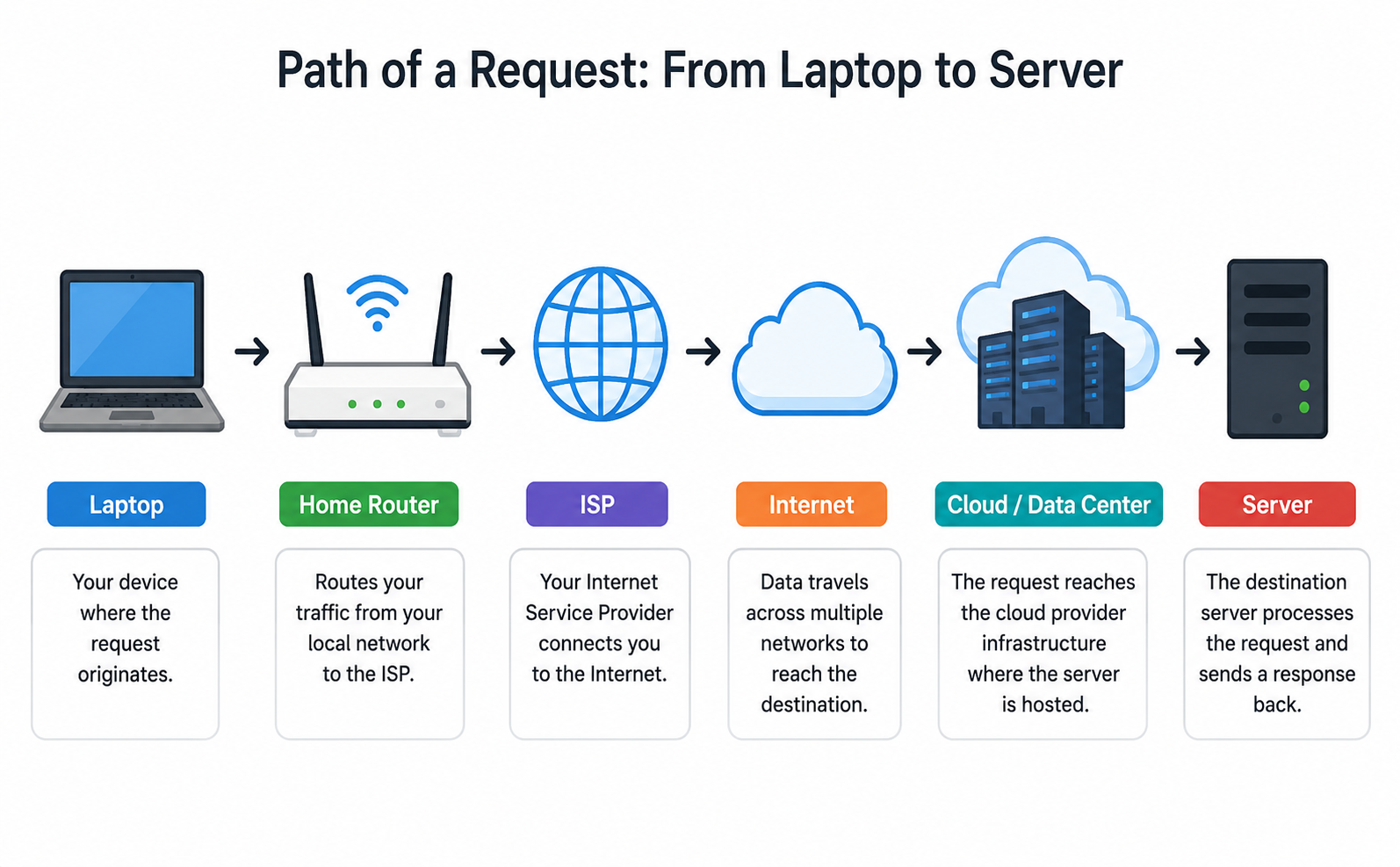
The Internet is essentially a massive network of interconnected networks.
Why Do We Need Computer Networks?
At first glance, networking seems simple:
Computer A wants to send data to Computer B.
But that simple requirement creates several problems.
Problem 1: How do we identify the destination?
If there are millions of devices, how does Computer A know which computer it wants to communicate with?
We need addressing like:
IP Address
MAC Address
Port Number
Problem 2: How does the data reach the destination?
Computer A and Computer B may not be directly connected.
Computer A
    │
    ▼
 Router 1
    │
    ▼
 Router 2
    │
    ▼
 Router 3
    │
    ▼
Computer B
The network needs a mechanism to determine where the data should go next.
This is the job of routing.
Problem 3: Which application should receive the data?
Imagine we have the following servers running on the same machine:
Web Server
Database Server
SSH Server
Mail Server
All of these applications may be communicating over the network simultaneously.
How does the operating system know which application should receive incoming data?
That's where port numbers come in.
For example:
192.168.1.10:443
              ↑ Port
The IP address identifies the machine, while the port identifies the destination service/process endpoint.
Problem 4: What happens if data is lost?
Networks aren't perfect.
Packets can be:
Lost
Delayed
Duplicated
Delivered out of order
If an application requires reliable communication, something needs to handle these problems.
That's one of the reasons TCP exists.
Problem 5: How do different systems understand each other?
A Windows machine, Linux server, router, and smartphone need common rules for communication.
These rules are called protocols.
Examples:
Ethernet
IP
TCP
UDP
DNS
HTTP
TLS
A protocol essentially defines how communication should happen.
The Basic Components of a Network
At a high level, a network contains several important components.
- End Devices
These are devices that actually generate or consume data.
Examples: Laptop, Phone, Server, etc.
- Switch
A switch primarily connects devices within a local network.
PC A ───┐
PC B ───┼── Switch
PC C ───┘
It uses MAC addresses to make forwarding decisions within the local network.
We'll study switching properly later.
- Router
A router connects different networks.
Network A
    │
    ▼
  Router
    │
    ▼
Network B
Routers primarily make forwarding decisions using IP addresses and routing information.
- Network Interface
A device needs a network interface to communicate over a network.
Examples: Ethernet NIC, Wi-Fi adapter
The interface is where the operating system interacts with the network.
We'll later see why concepts such as network interfaces, sockets, and network namespaces become particularly important in Linux and DevOps.
A Network Is More Than Just "Connected Computers"
A common beginner's mental model is:
Computer A ───────── Computer B
But real-world communication involves several layers of functionality:
Application
    ↓
Transport
    ↓
Network
    ↓
Data Link
    ↓
Physical Network
Each layer solves a different problem.
For example:
HTTP
 ↓
TCP
 ↓
IP
 ↓
Ethernet
 ↓
Physical transmission
This layered approach is one of the most important ideas in Computer Networks.
Why Do We Need Layers?
Imagine trying to build a network protocol that handles everything:
Application data
+
Reliability
+
Routing
+
MAC addressing
+
Electrical signals
+
Encryption
+
Error handling
+
...
It would become extremely complicated.
Instead, networking separates responsibilities.
For example:
HTTP doesn't need to know how an Ethernet cable physically transmits bits.
Similarly ethernet doesn't need to understand what an HTTP request means.
Each layer has its own responsibility and communicates with the layer above/below it through defined interfaces.
This is called layering.
A simple example:
Suppose you open your browser and request:
https://example.com
At the application level, your browser essentially wants to send:
GET /
But that data cannot simply be sent directly across the Internet.
Conceptually, it moves through several layers:
HTTP Request
     ↓
TCP
     ↓
IP
     ↓
Ethernet / Wi-Fi
     ↓
Physical Network
Each layer adds the information necessary for its job.
Two Important Network Models
To organize all these networking concepts, we use network models.
The two models you will encounter most often are:
OSI Model
TCP/IP Model
The OSI model contains seven layers:
7 ─ Application
6 ─ Presentation
5 ─ Session
4 ─ Transport
3 ─ Network
2 ─ Data Link
1 ─ Physical
The TCP/IP model groups these responsibilities into fewer layers:
Application
Transport
Internet
Network Access
We'll study both models in detail in the next topic.


