Computer Networks #16: QUIC and HTTP/3
What is QUIC?
At first this might sound strange because QUIC runs on top of UDP, and UDP itself does not provide reliability, ordered delivery, congestion control, or retransmission.
That does not mean QUIC behaves like raw UDP.
QUIC builds those features itself.
It provides reliable delivery, congestion control, flow control, multiplexed streams, encryption, loss recovery, connection establishment, and connection migration.
So the stack looks something like this:
Application
     ↓
    QUIC
     ↓
    UDP
     ↓
     IP
UDP mainly provides QUIC with a way to send datagrams across the existing Internet.
QUIC then implements most of the transport behavior that applications traditionally depended on TCP for.
QUIC Has TLS Built Into Its Handshake
With HTTPS over TCP, we normally have two different mechanisms involved.
TCP first establishes the transport connection.
Then TLS establishes the secure connection.
HTTP
 ↓
TLS
 ↓
TCP
QUIC handles this differently.
QUIC version 1 integrates TLS 1.3 directly into the QUIC handshake.
TLS handshake information is carried inside QUIC CRYPTO frames, and the keys generated by TLS are used directly to protect QUIC packets.
Because transport establishment and cryptographic negotiation happen together, QUIC can establish secure connections with fewer round trips.
Why Does QUIC Run Over UDP?
Technically, an IP protocol number could be assigned to a new transport.
The problem is deployment.
The Internet contains huge amounts of existing infrastructure such as routers, NAT devices, firewalls, load balancers, operating systems, and other middleboxes that already understand TCP and UDP.
Deploying a completely new transport directly over IP could require changes across large parts of this infrastructure, and unknown traffic may be blocked by some networks.
QUIC instead uses UDP as its substrate.
IP
 ↓
UDP
 ↓
QUIC
In IPv4, the IP Protocol field identifies UDP using protocol number 17. IPv6 has an equivalent Next Header mechanism.
From the network's perspective, QUIC traffic therefore looks like UDP traffic.
This gives QUIC two important advantages.
It can traverse much of the existing Internet infrastructure without requiring every router, NAT, and firewall to understand QUIC.
It can also be implemented in user space, which means protocol improvements can often be shipped through application or library updates rather than waiting for operating-system kernels to implement a new transport protocol.
User-space implementation is not a fundamental requirement of QUIC, but UDP makes it practical.
TCP + TLS vs QUIC Connection Establishment
Connection setup is one of the major advantages of QUIC.
Consider a fresh HTTPS connection using TCP and TLS 1.3.
First TCP needs its three-way handshake:
Client                         Server

SYN -------------------------->

    <---------------------- SYN + ACK

ACK -------------------------->
That costs approximately 1 RTT.
Then TLS performs its cryptographic handshake.
Client                         Server

ClientHello ------------------>

      <---------------- ServerHello
                       Certificate
                       Finished

Finished --------------------->
TLS 1.3 takes another round trip before the client can send normal protected application data.
So a fresh TCP + TLS 1.3 connection generally needs roughly:
TCP handshake      = 1 RTT
TLS 1.3 handshake  = 1 RTT

Total              ≈ 2 RTT
Older TLS versions could require even more.
QUIC combines transport establishment and the TLS handshake.
The client's first QUIC Initial packet can already contain the TLS ClientHello.
Conceptually:
Client                         Server

QUIC Initial
+ ClientHello ---------------->

                    QUIC Initial
                    + Handshake
                    <------------

Protected application data --->
A fresh QUIC connection can therefore make application data available after a 1-RTT handshake rather than first establishing TCP and then performing TLS separately.
QUIC and 0-RTT
QUIC can go one step further.
If the client has previously connected to the same server, it may be able to use 0-RTT connection resumption.
The server can previously provide information such as a TLS session ticket. The client remembers the required TLS and QUIC connection parameters.
On a later connection, the client can send application data immediately:
Client                         Server

Initial
ClientHello
0-RTT Application Data ------->
The client does not have to wait for a response from the server before transmitting that early application data.
This is what 0-RTT means.
It does not mean the server magically responds in zero time. It means the client can send application data without first waiting for a network round trip.
There is an important security trade-off.
0-RTT data can potentially be replayed by an attacker.
Imagine something like:
POST /transfer-money
If such a request were replayed, the operation could accidentally happen twice.
HTTP clients therefore have to be careful about which requests they send using early data. Without additional knowledge about the application, HTTP specifications allow clients to use safe methods for early data and prohibit unsafe methods.
Requests such as GET and HEAD are common examples of requests suitable for this model. It is not a QUIC-level rule saying that POST or DELETE can never use 0-RTT. The decision depends on HTTP semantics, replay safety, client behavior, and server configuration.
A server can also reject an early request using:
425 Too Early
and require the client to retry after the handshake completes.
Another Problem With TCP: Connection Identity
A traditional TCP connection is identified using information that includes:
Source IP
Source Port
Destination IP
Destination Port
This is commonly called the connection's 4-tuple.
Suppose you are using your phone on Wi-Fi.
Phone
  ↓
Wi-Fi
  ↓
Server
Then you leave the house and the phone switches to mobile data.
Your network address changes.
Phone
  ↓
5G
  ↓
Server
For a normal TCP connection, the existing connection usually cannot simply continue using this new network path.
A new TCP connection needs to be established.
QUIC was designed to handle this situation better.
QUIC Connection Migration
QUIC introduces Connection IDs.
Instead of identifying a connection only using the IP address and port combination, QUIC packets can contain a Connection ID that allows the endpoint to associate packets with the existing QUIC connection.
So even if the client's network changes:
Wi-Fi
192.x.x.x
    |
    | Connection ID = X7A92
    ↓
 Server
and later:
5G
10.x.x.x
    |
    | Connection ID = X7A92 / another valid CID
    ↓
 Server
the server can still associate the traffic with the same logical connection.
QUIC also performs path validation before fully trusting a new network path.
This allows QUIC connections to survive situations such as switching from Wi-Fi to mobile data and NAT rebinding without necessarily establishing a completely new connection.
QUIC can even issue multiple Connection IDs over a connection so that endpoints can change IDs during migration and reduce the ability of observers to correlate traffic across networks.
Now We Can Understand HTTP/3
HTTP/3 is essentially the mapping of HTTP semantics onto QUIC.
The familiar HTTP concepts remain:
GET
POST
PUT
DELETE

Headers
Status codes
Request body
Response body
HTTP/3 does not completely reinvent HTTP.
What changes significantly is the transport underneath it.
HTTP/1.1
   ↓
  TCP


HTTP/2
   ↓
  TCP


HTTP/3
   ↓
  QUIC
   ↓
  UDP
HTTP/3 gets several important features from QUIC, including stream multiplexing, per-stream flow control, low-latency connection establishment, encryption, and connection migration.
Why HTTP/2 Still Had Head-of-Line Blocking
HTTP/2 introduced one of the most important improvements over HTTP/1.1:
multiplexing.
Multiple requests could share a single connection.
Conceptually:
TCP Connection

Stream 1 → HTML
Stream 3 → CSS
Stream 5 → JavaScript
Stream 7 → Image
At the HTTP layer, these appear to be independent streams.
But TCP does not know anything about HTTP/2 streams.
TCP only sees one ordered byte stream:
Byte 1
Byte 2
Byte 3
Byte 4
Byte 5
...
Suppose one TCP segment containing some earlier bytes is lost.
TCP guarantees ordered delivery, so later bytes cannot be delivered to the application until those missing bytes have been retransmitted.
Even if the later bytes logically belonged to completely different HTTP/2 streams, HTTP/2 cannot access them yet.
TCP byte stream

A B C [LOST] E F G H
       ↑

Everything after this point waits.
This is called TCP-level head-of-line blocking.
HTTP/2 solved many forms of application-level blocking, but it could not remove this property of TCP.
QUIC Streams Solve This Differently
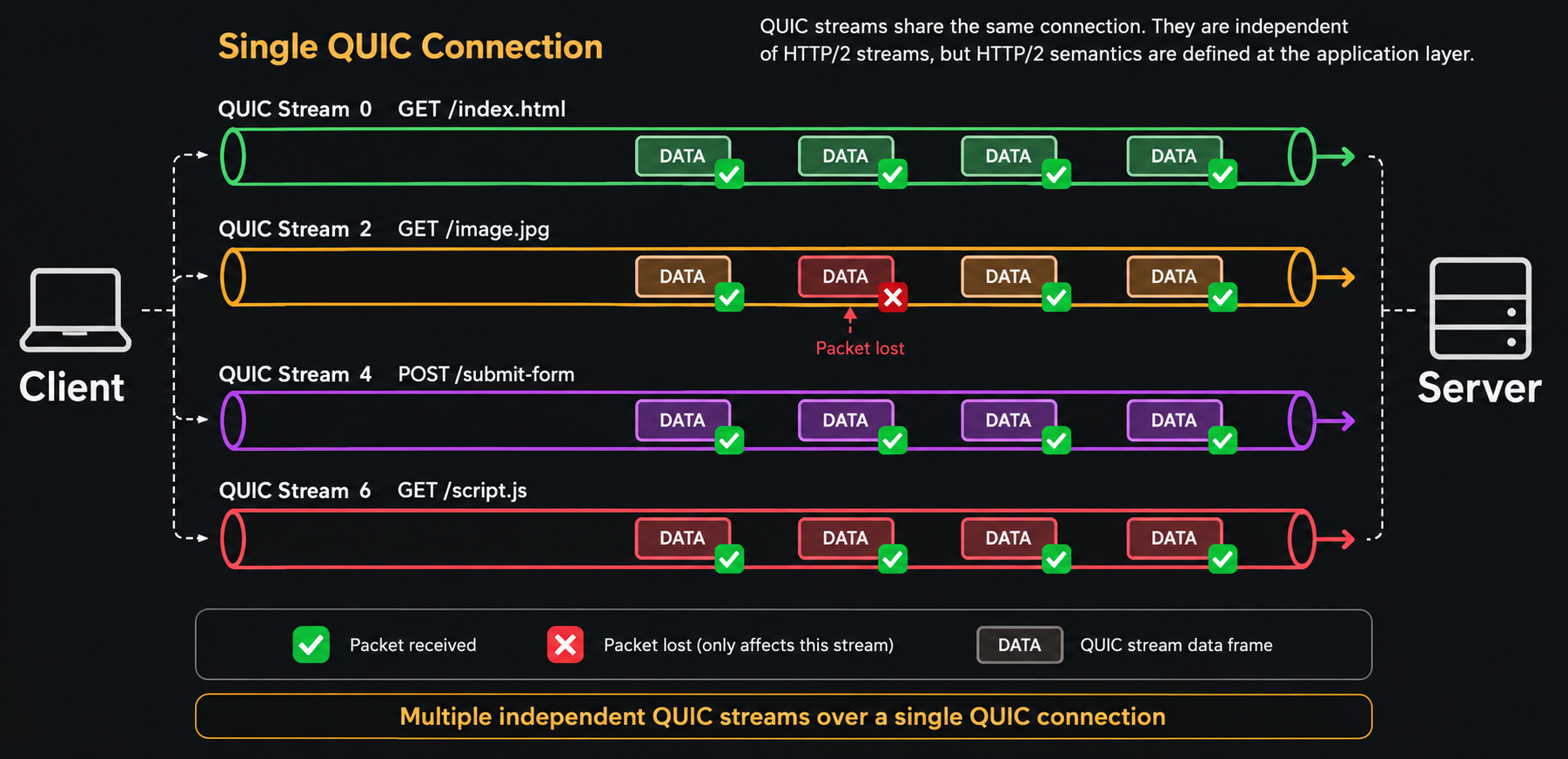
QUIC has streams directly inside the transport protocol.
Each stream has its own independent ordered byte sequence.
For example:
QUIC Connection

Stream 0 → Request A
Stream 4 → Request B
Stream 8 → Request C
Stream 12 → Request D
Suppose data belonging to Stream 4 is lost.
Stream 0  → continues
Stream 4  → waits for missing data
Stream 8  → continues
Stream 12 → continues
QUIC only needs to restore ordering inside the affected stream.
Other independent streams can continue making progress.
This is the major reason HTTP/3 eliminates TCP's connection-wide head-of-line blocking problem.
There is one nuance.
A single QUIC packet can contain frames belonging to multiple streams. If that packet is lost, every stream whose data was inside that packet might temporarily need retransmission.
Also, congestion control still operates at the connection level, so packet loss can reduce the sending rate of the whole connection.
So QUIC does not make packet loss irrelevant. It prevents one missing byte sequence from unnecessarily stopping unrelated streams.
One HTTP Request Gets One QUIC Stream
HTTP/3 maps each request-response exchange onto a client-initiated bidirectional QUIC stream.
Conceptually:
QUIC Connection

Stream 0
GET /index.html
← HTML response


Stream 4
GET /style.css
← CSS response


Stream 8
GET /app.js
← JavaScript response
These are not separate network connections.
They are independent logical streams multiplexed over the same QUIC connection.
Calling them "virtual connections" can help build intuition, but technically they are streams inside one QUIC connection.
The distinction matters because connection-level state such as congestion control and security is still shared.
HTTP/3 Frames vs QUIC Frames
This distinction is easy to miss because both HTTP/3 and QUIC use something called frames.
They are not the same thing.
HTTP/3 has application-layer frames such as:
HEADERS
DATA
SETTINGS
GOAWAY
QUIC has transport-layer frames such as:
STREAM
ACK
CRYPTO
MAX_DATA
MAX_STREAM_DATA
PING
CONNECTION_CLOSE
So when HTTP/3 sends a request, the structure can conceptually look like:
IP Packet
   ↓
UDP Datagram
   ↓
QUIC Packet
   ↓
QUIC STREAM Frame
   ↓
HTTP/3 HEADERS / DATA Frames
   ↓
HTTP Request
This layering is important.
For example, an HTTP/3 HEADERS frame may be carried as bytes inside a QUIC stream, while QUIC represents those bytes using one or more STREAM frames.
HTTP/3 frames can even span multiple QUIC packets.
Important QUIC Frames
A few QUIC frame types are particularly useful for understanding how the protocol works.
A STREAM frame carries application data belonging to a particular QUIC stream.
It contains information such as the stream ID, stream offset, data, and potentially a FIN bit.
A CRYPTO frame carries cryptographic handshake data, including the TLS handshake.
An ACK frame tells the peer which QUIC packets were successfully received.
Flow-control frames such as MAX_DATA and MAX_STREAM_DATA tell the sender how much additional data it is allowed to transmit.
Conceptually:
QUIC Packet

+--------------------------+
| QUIC Header              |
+--------------------------+
| ACK Frame                |
+--------------------------+
| STREAM Frame: Stream 4   |
+--------------------------+
| STREAM Frame: Stream 8   |
+--------------------------+
Multiple frame types can therefore be carried inside the same QUIC packet.
What Does FIN Mean in QUIC?
QUIC STREAM frames can contain a FIN bit.
The purpose of FIN is to indicate that the sender has reached the end of the data it intends to send on that stream.
For example:
STREAM ID = 8
OFFSET = 5000
DATA = ...
FIN = 1
This tells the receiver that this data reaches the final size of that stream.
The FIN bit itself is not what solves head-of-line blocking.
Head-of-line blocking is reduced because QUIC maintains ordering independently for each stream using stream IDs and offsets.
FIN simply marks completion of one direction of a stream.
This is similar in spirit to closing one side of a logical byte stream.
QUIC Packets and UDP Datagrams
TCP sends segments.
QUIC exchanges QUIC packets, which are carried inside UDP datagrams.
Conceptually:
IP Packet
   ↓
UDP Datagram
   ↓
QUIC Packet
   ↓
QUIC Frames
A UDP datagram can sometimes contain multiple QUIC packets, particularly during connection establishment.
Another interesting property is that when QUIC detects loss, it does not simply resend an identical packet with the same packet number.
The lost information is placed into new frames and transmitted inside a new QUIC packet with a new packet number.
This makes QUIC's loss-recovery model different from simply thinking of it as "TCP implemented over UDP."
Why HTTP/3 Uses QPACK Instead of HPACK
HTTP requests repeatedly contain similar headers:
Content-Type
Accept-Encoding
User-Agent
Cookie
Authorization
Sending these strings repeatedly wastes bandwidth.
HTTP/2 solves this using a header compression mechanism called HPACK.
HTTP/3 instead uses QPACK.
Why introduce another compression format?
Because HTTP/2 runs over one ordered TCP byte stream.
QUIC streams, on the other hand, are independent and can make progress at different speeds.
A header compression mechanism designed around globally ordered delivery can accidentally recreate dependencies between streams.
QPACK was designed specifically for QUIC's stream model.
It uses dedicated streams for managing the dynamic compression table and gives implementations control over how much blocking they are willing to allow.
So:
HTTP/2 → HPACK
HTTP/3 → QPACK
QPACK can still introduce limited blocking when a header block depends on dynamic-table entries that have not arrived yet, but its design prevents header compression from recreating the same kind of connection-wide dependency that HTTP/3 is trying to avoid.
QUIC Is Not Only for HTTP/3
One important thing to remember is:
QUIC and HTTP/3 are not the same protocol.
QUIC is a general-purpose transport protocol.
HTTP/3 is one application protocol built on top of QUIC.
The relationship is similar to:
HTTP
SMTP
SSH
PostgreSQL
   ↓
  TCP
QUIC can also support multiple application protocols:
HTTP/3
DNS over QUIC
Other protocols
      ↓
     QUIC
      ↓
     UDP
HTTP/3 just happens to be the most widely recognized application of QUIC.
What Happens if UDP Is Blocked?
Because QUIC uses UDP, there are networks where QUIC traffic may not work properly.
This is another reason replacing TCP across the whole Internet did not happen overnight.
HTTP clients can fall back to HTTP/2 or HTTP/1.1 over TLS and TCP when HTTP/3 cannot be used.
Conceptually:
Try:

HTTP/3
  ↓
QUIC
  ↓
UDP

If unavailable:

HTTP/2
  ↓
TLS
  ↓
TCP
This makes HTTP/3 deployable without requiring every network on the Internet to support QUIC perfectly from day one.
Putting Everything Together
The evolution becomes easier to understand when we look at the problem each version was trying to solve.
HTTP/1.1

Multiple TCP connections
Limited request concurrency
Application-level blocking
        ↓

HTTP/2

One TCP connection
Multiple HTTP streams
Binary framing
HPACK
        ↓

Problem remaining:

All streams still depend on
one ordered TCP byte stream
        ↓

TCP packet loss
can block unrelated streams
        ↓

HTTP/3

HTTP semantics
        ↓
QUIC streams
        ↓
Independent stream ordering
        ↓
UDP
QUIC also improves connection establishment:
TCP + TLS 1.3
≈ 2 RTT for a fresh secure connection

QUIC
≈ 1 RTT for a fresh connection

QUIC resumption
0-RTT application data can sometimes
be sent immediately
And because QUIC connections can use Connection IDs:
Wi-Fi → Mobile Data

TCP:
connection usually needs rebuilding

QUIC:
existing connection can potentially migrate
to the new network path
Final Mental Model
The easiest way to remember the relationship is:
HTTP/3
     ↓
Defines HTTP semantics and HTTP frames

QUIC
     ↓
Provides streams, reliability,
flow control, congestion control,
TLS 1.3 security and connection migration

UDP
     ↓
Provides datagrams and deployability

IP
     ↓
Routes packets across networks
HTTP/3 is not faster simply because it uses UDP.
Raw UDP gives none of the reliability guarantees that HTTP needs.
The real improvement comes from QUIC building a modern transport model on top of UDP: secure connection establishment, independent streams, loss recovery, flow control, congestion control, and connection migration.
HTTP/2 showed that multiplexing HTTP requests was valuable.
HTTP/3 goes one layer deeper and makes multiplexing a property of the transport protocol itself.
That is the fundamental idea behind QUIC and HTTP/3.